Your Labeling Spreadsheet Worked. That’s the Problem.
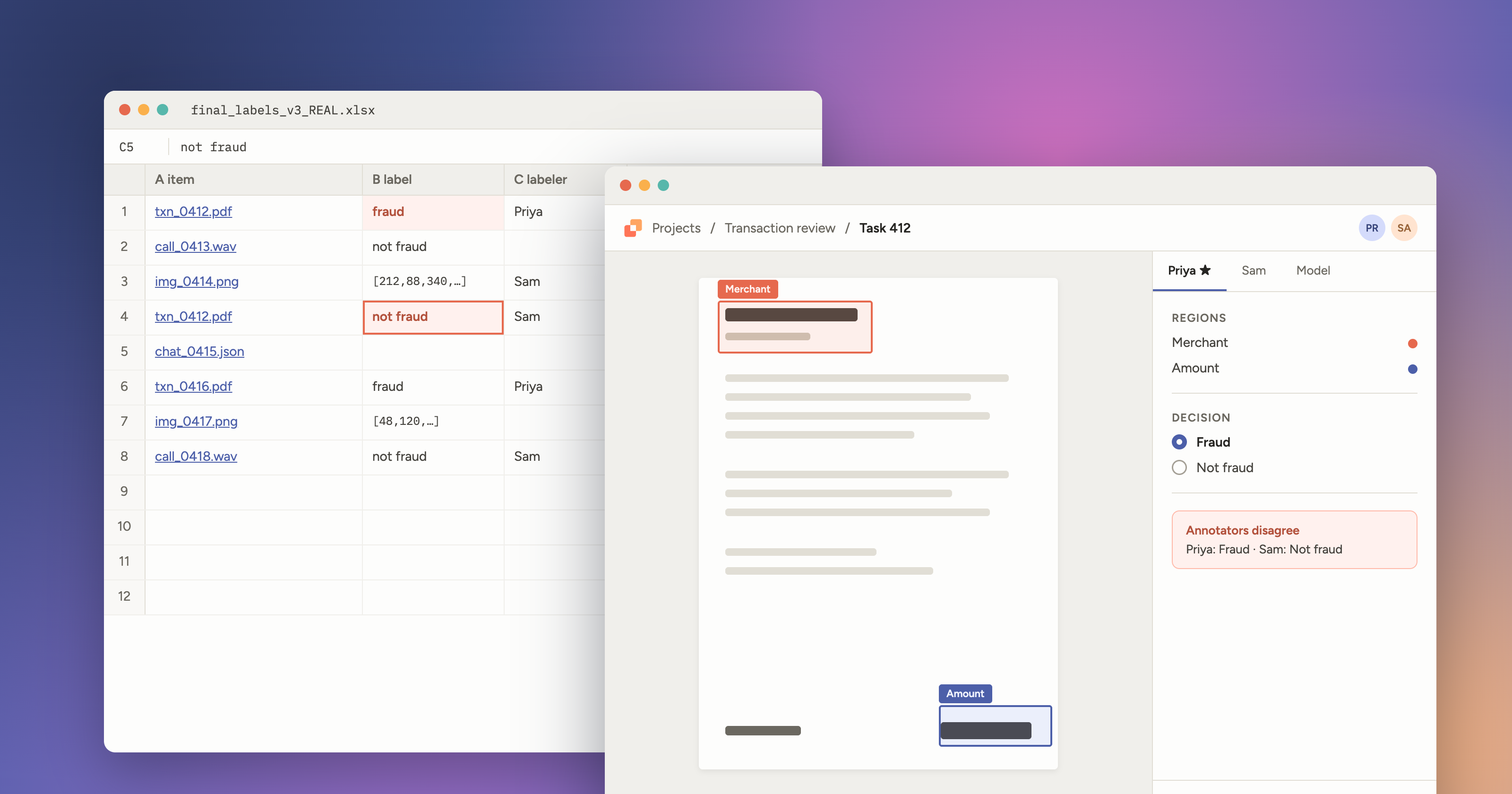
You’re probably familiar with this set up. You’re asked to collect a small amount of data labeled with a certain category for a POC. You grab a spreadsheet, throw in your data, and maybe leave some notes that no one will read along the way. In a few days, you have completed the task, and you understand where your project needs to go.
Almost every AI team we work with started labeling this way, and we don't think it was a mistake. A sheet costs nothing, everyone already knows how to use it, and on day one the only question is whether the idea works at all.
Spreadsheets may be good for some kinds of tasks, particularly those where you’re selecting some label from a drop down list. But many teams find they quickly hit a wall when they try to add new label types or data that isn’t text.
The bigger problem comes when the prototype becomes a project. The project gets a deadline, and the spreadsheet that answered the first question is now holding up everything after it.
Where the sheet breaks
While spreadsheets seem like a great choice at first, we find that customers of Label Studio often hit the same set of failure points:
- A second labeler joins. Now there are two copies of the file, or one shared file where people overwrite each other's work. Someone adds a labeler column. Someone else forgets to fill it in.
- The data stops fitting in a cell. Images, PDFs, audio, call transcripts and multi-turn chats end up as links in column B. The labeler opens a new tab, looks at the item, comes back and picks from the dropdown. Two thousand rows later, the labels have drifted.
- The label stops fitting in a cell. Bounding box coordinates don’t fit cleanly in a cell, or you’re transposing data from one tool into the sheet, which is prone to mistakes. What happens when you want to highlight a particular part of the text or a video clip?
- Experts disagree, and nobody can see it. One reviewer marks a transaction "fraud." Another marks a nearly identical one "not fraud." In a sheet, both are just values in a column. You find the disagreement when the model does something strange in staging.
- Someone asks which labels trained the model. The answer is a file name like final_labels_v3_REAL.xlsx, probably in someone's Drive. If you can't rebuild last quarter's training set, you can't explain why the new model behaves differently.
- Security asks who touched what. A share link isn't access control. Once the data includes customer records, health information or anything regulated, "we think it was Priya" won't pass an audit.
Moving off the sheet takes an afternoon
Migration used to be a real project, and that's why teams stay in spreadsheets too long. The sheet isn't good, but finding a new tool, learning it, and getting going with your project feels too expensive.
Two things have changed. You no longer design a labeling UI by hand, and you no longer write the glue code yourself. A coding agent can do most of the setup from your sheet and a short description of the task.
- Bring the sheet as it is. Save it as CSV and import it. Each row becomes a task, and the column names become the fields your labeling view reads.
- Describe the task, not the UI. Give Claude Code, Cursor or Codex your column names and a paragraph on what labelers should decide. With our labeling config skill and the Label Studio SDK, the agent writes the config, creates the project and imports your rows. Point it at llms.txt so it works from the current docs.
- Run a pilot batch. Have two people label the same 50 to 100 tasks. Look at where they disagree, fix the instructions, and adjust the labels. A spreadsheet makes this step hardest, and it's where most label quality comes from.
- Map the export back. Have the agent write the export into the format your training pipeline already reads, so nothing downstream changes.
What it looks like in practice
One fintech AI team went from spreadsheets to open source Label Studio to Label Studio Enterprise in under three months. Their labeling didn't change much. What changed is that they could finally see it: who labeled what, where reviewers disagreed, and which version of the data went into each model.
That's the usual path. Open source handles a small team getting off the sheet. Teams move to Label Studio Enterprise when more groups or regulated data join and they need role-based access, audit logs and review workflows. Enterprise also includes Interfaces: the most powerful way to build totally custom labeling UIs. Either way, start from a template built for your use case or have an agent build a custom labeling view, and keep those controls.
What this means if you're still in a spreadsheet
Stay there if you're one person labeling a few hundred rows of text for a one-off experiment. But decide now what will make you move. We'd suggest any one of these:
- A second person starts labeling
- The data (or labels) no longer fits in a cell
- A model trained on these labels goes to production
- The data includes anything regulated
Moving at that point takes an afternoon. Moving six months later means relabeling, because by then nobody can say which labels are right.
Install Label Studio open source and import your sheet today. If you're labeling across teams or working with regulated data, talk to us about Label Studio Enterprise.
Related Content
-

Rubric Design: The Missing Layer Between Guidelines and Good Annotations
Guidelines that read clearly can still produce annotators who disagree. Rubric design is the missing layer, and this post shows how we make it explicit, inspectable, and testable before labeling starts.

Nikolai Liubimov
September 22, 2026
-

The Sweet Science of Subjective Evaluation
What chocolate tasting taught us about human annotation, data quality, and evaluating AI at scale.

Micaela Kaplan
April 16, 2026
-

How to evaluate AI agents in production
Learn how to evaluate AI agents in production by moving from single-turn metrics to trajectory evaluation using human-in-the-loop trace review.

HumanSignal Team
March 25, 2026