Doclang 🔒
This template creates a Doclang document annotation Interface for turning document images into a structured DoclingDocument — layout regions, reading order, table structure, and key/value pairs — with in-browser OCR and a live DocLang XML preview.
Annotators draw layout regions (text, section headers, lists, tables, pictures, formulas, code, key/value, and more), set the reading order and other element relationships with paths, mark up table grid and semantic structure, transcribe text with one-click in-browser OCR, and watch the resulting <doclang> XML render in real time — producing the structured output that document-conversion and Document AI teams need to build DoclingDocument datasets.
Part of the Docling ecosystem
Docling is an open-source toolkit that parses documents (PDFs, images, and more) into a structured DoclingDocument. This Interface is the human-in-the-loop annotation and review layer for that format.
To pre-label documents automatically before review, pair it with the Docling ML backend. It sends each document to IBM Docling SaaS — the hosted Docling conversion service you connect to with a tenant URL and API key from Docling Workbench — and returns the layout as rectanglelabels / polygonlabels predictions this Interface reads, so annotators correct Docling's output instead of starting from a blank page.
Requires an allowlist change
This Interface loads two third-party libraries from public CDNs at runtime, so it will not work until an Owner or Admin adds those CDN hosts to your organization's Interfaces allowlist. See Before you start: allowlist the required domains below — this is the first thing to do, and the most common reason the preview or OCR appears broken.
The example Interface includes:
- Document image viewer with dynamic zoom and pan for large, high-resolution pages.
- Layout labels grouped by purpose — Common (text, section header, list item, table, picture, caption), Other (footnote, formula, code, form, index, handwritten text), Page (page header/footer), Table structure and Table region semantics, Key-Value, and Checkboxes — with single-key hotkeys for the most-used labels.
- Reading order and relationship paths — draw
reading_order,merge,group, and container/link paths (to_caption,to_footnote,to_value) between regions. - In-browser OCR via Tesseract.js — no OCR service to stand up; text-bearing boxes can auto-transcribe the moment you finish drawing them.
- Live DocLang preview with two tabs: xml (the raw
<doclang>XML markup with syntax highlighting) and Reading view (the rendered, human-readable document), both driven by the official DocLang viewer. - Configurable OCR language and model, color theme, default content layer, and default picture type via Interface params.
Enterprise
Interfaces can only be used in Label Studio Enterprise and Starter Cloud.
note
To use template Interfaces, you must first create an editable copy of the Interface. From Interfaces > Templates, select the overflow menu next to the template you want to use and click Duplicate.
Before you start: allowlist the required domains
Unlike most templates, this Interface depends on two libraries that it loads from public CDNs while it runs in the labeling iframe. The Interfaces sandbox blocks all outbound network by default (a Content Security Policy, or CSP), so those CDN hosts have to be added to your organization’s allowlist before the Interface can render its preview or run OCR.
There is nothing to install — the whole render and OCR pipeline runs in the browser — but the two hosts below must be reachable.
| Host | What it provides | Why it’s needed | Roughly how much |
|---|---|---|---|
https://cdn.jsdelivr.net |
The DocLang viewer (a SHA-pinned mirror of the official viewer) | Renders the xml and Reading view preview tabs. The preview will not render without it. | ~165 KB of JS + CSS, loaded per render but cached forever (the URL is SHA-pinned and jsDelivr serves it immutable). |
https://unpkg.com |
Tesseract.js (JS + WASM + language model) | Runs the in-browser OCR that transcribes regions. OCR will not run without it. | ~3–11 MB, downloaded once on the first OCR click (or when you switch OCR language/model) and cached for the session. |
These are the only two external hosts the Interface requires. Your own Label Studio server origin is always allowed automatically, so you don’t need to add it.
Where to add them
Both hosts must be added in two places on the Organization > Settings > Interfaces page, because the browser treats “load the script” and “fetch the WASM/model files” as two different permissions:
- Advanced: external scripts — enable Allow external scripts / stylesheets, then add
https://cdn.jsdelivr.netandhttps://unpkg.com. This lets the Interface load the viewer and OCR libraries as<script>/<style>tags (the CSPscript-srcdirective). - API origins — add
https://cdn.jsdelivr.netandhttps://unpkg.comhere as well. This lets the Interfacefetchthe viewer assets and the OCR WASM/model files (the CSPconnect-srcdirective).
Only Owners and Admins can change these settings, and they apply to every Interface in the organization. Use the exact origins (scheme + host, no paths or wildcards). For full details on each section, see Interface admin settings and Use external libraries and services.
How to tell it's an allowlist problem
If the preview pane shows "Failed to load DocLang viewer … from cdn.jsdelivr.net … has not been added to the LSE org allowlist", or clicking OCR never returns text, the hosts above are almost certainly missing from one of the two sections. Add them to both and reload.
Interface UI
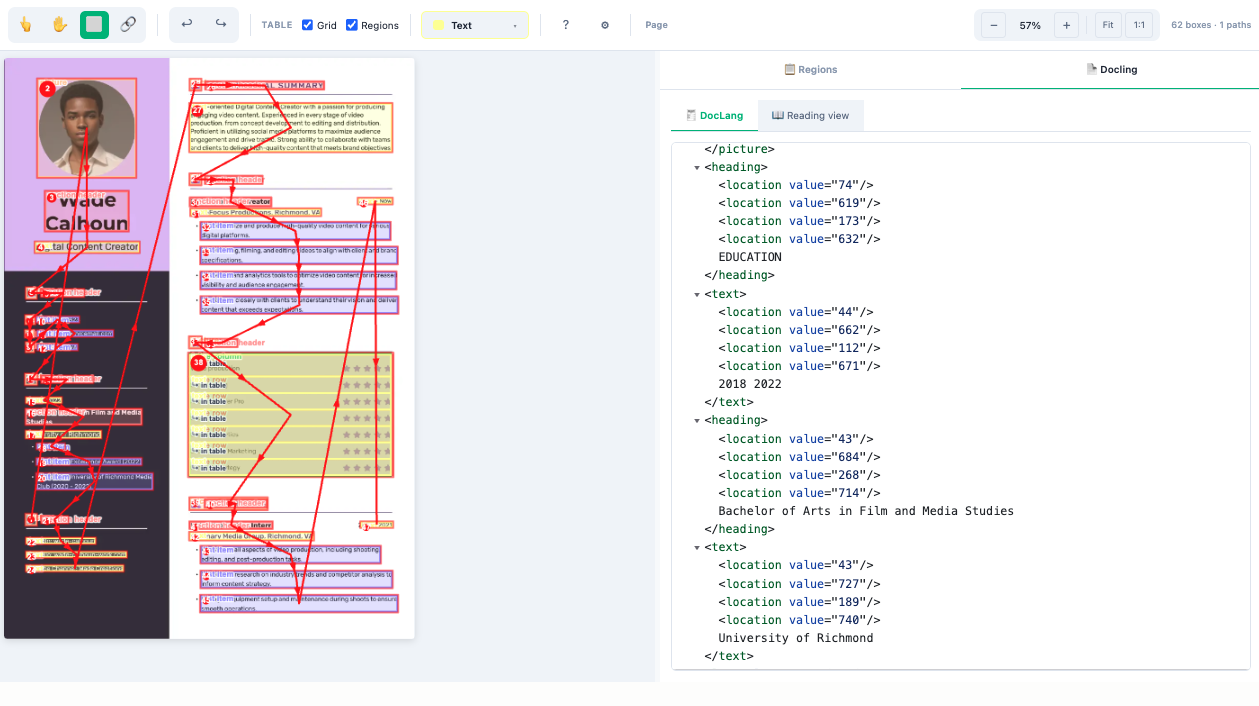
The Interface is divided into a labels rail on the left, a document canvas in the center, and a live DocLang preview on the right.
Labels rail
Layout labels grouped into collapsible categories (Common, Other, Page, Table structure, Table regions, Key-Value, Checkboxes). Selecting a label sets what the next region you draw will be tagged as; the most common labels have single-key hotkeys (for example 1 text, 2 section_header, 3 list_item, 4 table). A separate set of path tools draws relationships between regions — reading_order (r), merge (m), group (g), and the to_caption / to_footnote / to_value link paths.
Document canvas
The main annotation surface.
- The source document image (from the
imagefield) renders with dynamic zoom and pan for large pages. - Draw a box to create a layout region; text-bearing labels (text, section_header, list_item, caption, footnote, and others) auto-run OCR when you release the mouse so the region is transcribed for you. Container labels (table, picture, form) and structural overlays are deliberately excluded so OCR doesn’t fire on non-text regions.
- Table structure is captured with grid labels (
table_row,table_column,table_merged_cell) and semantic labels (row_header,column_header,row_section,body). - Reading order and other paths are drawn point-to-point across regions and are validated as you go.
DocLang preview
A right-side panel with two tabs, both rendered by the official DocLang viewer loaded from jsDelivr:
- xml — the raw serialized
<doclang>XML for the current annotation, with syntax highlighting. This is the DoclingDocument snapshot the Interface saves. - Reading view — the same document rendered as a human-readable page, so annotators can sanity-check that their regions and reading order produce a sensible document.
React code
The full Screen.jsx source is roughly 9,300 lines, so the snippets below highlight the parts you are most likely to customize:
- The params you wire to your task data and OCR settings,
- The label catalog that defines the region labels and their hotkeys,
- The
customRenderer/customOcrpipeline hooks, - The result shape it writes back to Label Studio.
Interface params
Set or rename a param on the Interface config to point at a different task field or to change the OCR and preview behavior. The defaults mirror the example input below.
const paramsSchema = {
  type: "object",
  properties: {
    imageField: {
      type: "string",
      title: "Image field",
      description: "Key inside task.data that holds the document image URL.",
      default: "image",
    },
    doclangViewerRef: {
      type: "string",
      title: "DocLang viewer ref (commit, tag, or branch)",
      description:
        "Which version of the DocLang viewer to load in the preview tabs. " +
        "A commit SHA is strongly preferred (jsDelivr caches it forever). " +
        "Change this to ship a viewer fix without re-publishing the Interface.",
      default: DOCLANG_VIEWER_DEFAULT_REF,
    },
    tesseractLanguage: {
      type: "string",
      enum: TESSERACT_LANGUAGE_DISPLAY_NAMES,
      title: "OCR language",
      default: TESSERACT_DEFAULT_LANGUAGE_DISPLAY,
    },
    tesseractModel: {
      type: "string",
      enum: TESSERACT_MODEL_DISPLAY_NAMES,
      title: "OCR model variant",
      default: TESSERACT_DEFAULT_MODEL_DISPLAY,
    },
    darkMode: { type: "string", enum: ["auto", "on", "off"], default: "auto" },
    defaultContentLayer: { type: "string", enum: CONTENT_LAYERS, default: "BODY" },
    defaultPictureType: { type: "string", enum: PICTURE_TYPES, default: "OTHER" },
  },
};
Label catalog
LABEL_CATEGORIES is the source of truth for the layout labels, their colors, and their hotkeys. Edit it to add, remove, or recolor labels — keep the name values aligned with the DoclingDocument element types you want to produce.
const LABEL_CATEGORIES = {
  common: {
    title: "📝 Common",
    labels: [
      { name: "text",           color: "#FFFF99", hotkey: "1" },
      { name: "section_header", color: "#FF9999", hotkey: "2" },
      { name: "list_item",      color: "#9999FF", hotkey: "3" },
      { name: "table",          color: "#FFCCCC", hotkey: "4" },
      { name: "picture",        color: "#FFCCA4", hotkey: "5" },
      { name: "caption",        color: "#FFCC99", hotkey: "6" },
    ],
  },
  // other, page, tableStructure, tableRegion, keyValue, checkboxes ...
};

const PATH_TYPES = [
  { name: "reading_order", color: "#FF0000", hasLevel: true, hotkey: "r" },
  { name: "merge",         color: "#FF00FF", hotkey: "m" },
  { name: "group",         color: "#FFFF00", hotkey: "g" },
  { name: "to_caption",    color: "#00FF00" },
  { name: "to_footnote",   color: "#00FF00" },
  { name: "to_value",      color: "#00FF00" },
];
Render and OCR pipeline
The preview and OCR paths are two module-level const functions near the top of Screen.jsx. Swap customRenderer to change how regions become DocLang XML, or customOcr to plug in a different OCR engine (for example a remote service or a different WASM model).
// regions -> DocLang XML for the live preview + saved snapshot
const customRenderer = async ({ image_url, image_width, image_height, regions }) =>
  ({ doclang_xml });

// image crop -> recognized text (Tesseract.js, in the browser)
const customOcr = async ({ image_data, lang, model_variant }) =>
  ({ text, confidence });
Result shape
getResults emits Label Studio results under two from_names: spatial annotations under doclang and the serialized DocLang XML snapshot under doclang_xml. Boxes are rectanglelabels, paths (reading order, links) are polygonlabels, and the DoclingDocument XML is a single hidden textarea region.
function getResults(regions, relations) {
  const out = [];
  for (const r of regions || []) {
    if (r._kind === "rectangle") {
      out.push({
        id: r.id, from_name: "doclang", to_name: "doclang",
        type: "rectanglelabels",
        value: {
          x: r._x, y: r._y, width: r._width, height: r._height,
          rectanglelabels: r.labels,
          content_layer: r._content_layer || "BODY",
          picture_type: r._picture_type || null,
          text: r._text || "",
        },
      });
    } else if (r._kind === "polyline") {
      out.push({
        id: r.id, from_name: "doclang", to_name: "doclang",
        type: "polygonlabels",
        value: { points: r._points, polygonlabels: r.labels, closed: false },
      });
    } else if (r._kind === "doclang_xml") {
      out.push({
        id: r.id, from_name: "doclang_xml", to_name: "doclang",
        type: "textarea",
        value: { text: [r._doclang_xml || ""] },
      });
    }
  }
  return out;
}
Rectangle coordinates x, y, width, and height are image-relative percentages (0-100); path points are [x, y] percentage pairs.
Example input
The Interface expects a task data object with a document image URL. The field name is configurable via imageField (default image). For PDFs, rasterize to per-page PNGs first.
Click to expand
{
  "data": {
    "image": "https://example.com/scans/invoice-2026-05-13.png"
  }
}
Example output
The saved annotation contains one result per region under from_name: "doclang", plus a single from_name: "doclang_xml" result holding the serialized DoclingDocument XML.
{
  "result": [
    {
      "id": "r1",
      "from_name": "doclang",
      "to_name": "doclang",
      "type": "rectanglelabels",
      "value": {
        "x": 12.5, "y": 8.2, "width": 75.0, "height": 4.8,
        "rectanglelabels": ["section_header"],
        "content_layer": "BODY",
        "picture_type": null,
        "text": "Quarterly Revenue Summary"
      }
    },
    {
      "id": "r2",
      "from_name": "doclang",
      "to_name": "doclang",
      "type": "polygonlabels",
      "value": {
        "points": [[14.0, 10.0], [14.0, 42.0], [86.0, 42.0]],
        "polygonlabels": ["reading_order"],
        "closed": false
      }
    },
    {
      "id": "r3",
      "from_name": "doclang_xml",
      "to_name": "doclang",
      "type": "textarea",
      "value": {
        "text": ["<doclang>\n  <section_header>Quarterly Revenue Summary</section_header>\n  <!-- ... -->\n</doclang>"]
      }
    }
  ]
}